 OpenCCTV
Your cameras. Your server. Your storage.
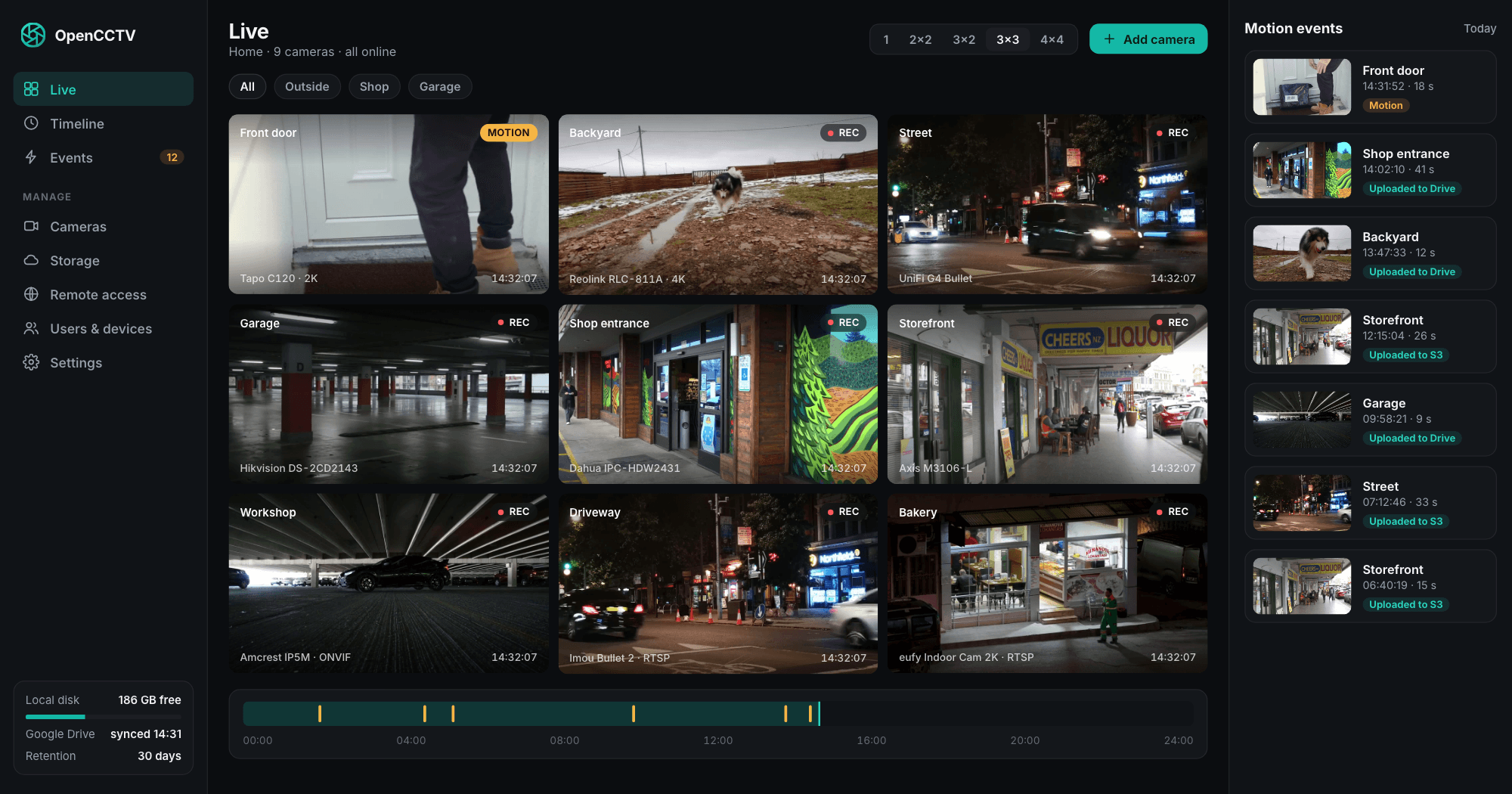
OpenCCTV is a free camera server and NVR for Tapo, UniFi, Reolink and any RTSP or ONVIF camera. It records 24/7 or on motion, uploads to Google Drive, S3 or your NAS, and streams to apps for iPhone and Android. No vendor cloud, no subscription, no account with us.
Try the live demo with login demo / demo. Real cameras, real recordings, nothing to install.
Works with the cameras you already own
- TP-Link Tapo
- UniFi Protect
- Reolink
- Hikvision
- Dahua
- Amcrest
- Axis
- eufy
- Foscam
- EZVIZ
- Imou
- Annke
- Wyze
- any ONVIF camera
- any RTSP stream
UniFi Protect cameras are imported in one step. eufy and Wyze need models or firmware with RTSP. Cameras that can only send video can push RTMP or RTSP to the server.
Everything an NVR should do. Nothing phoning home.
One binary or one container. Streaming by go2rtc, recording and motion detection by ffmpeg, uploads by rclone, glued together with a web UI and native apps.
Live view in under a second
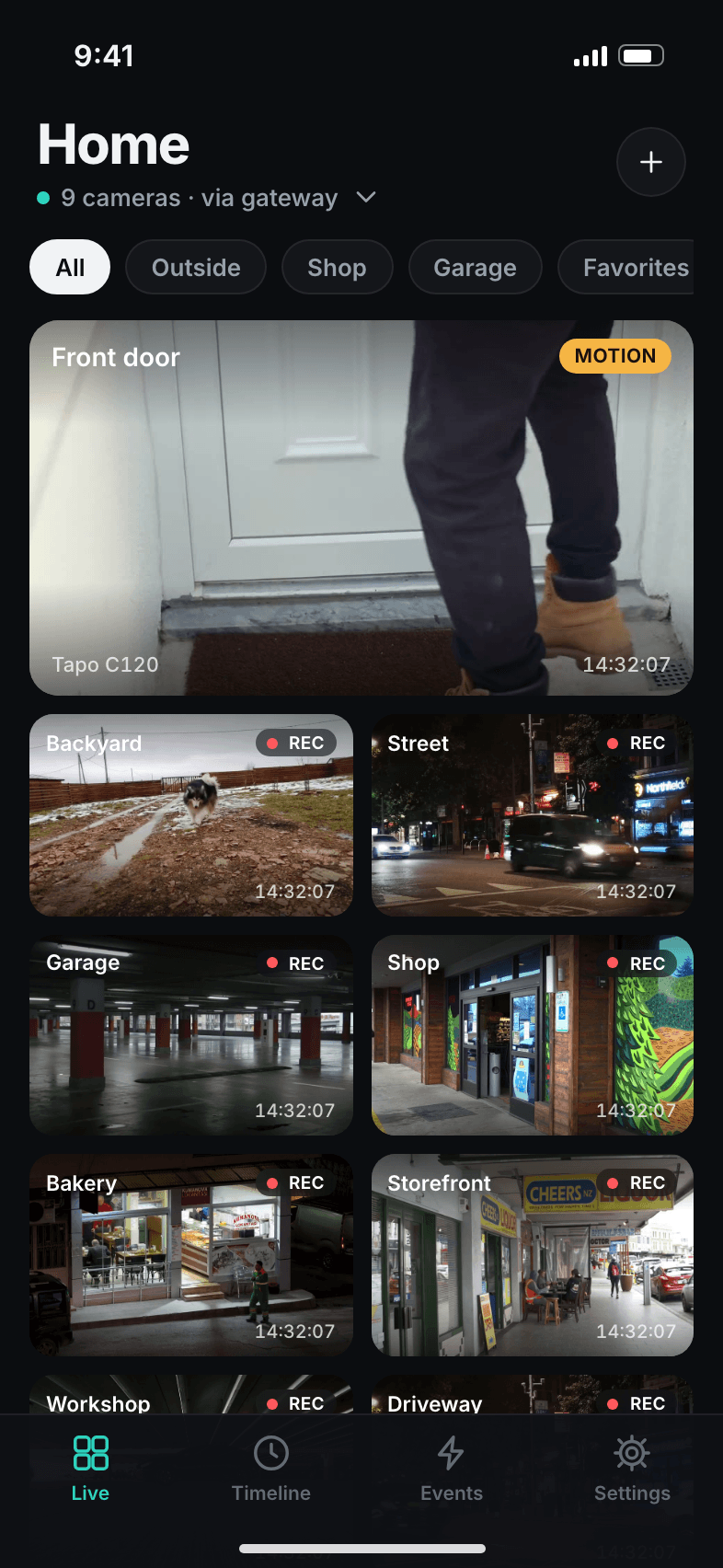
WebRTC with HLS fallback, HD and SD substreams, multi-camera grids in the app and the browser.
24/7 or motion recording
Continuous or motion-only per camera, with pre- and post-roll. Video is stored as the camera sends it, without re-encoding.
Timeline playback
Scrub through any day, jump from event to event and export a time range as MP4 to share.
Motion events and push
Every event with snapshot, time and duration. Push notifications per camera, with a cooldown so a tree in the wind does not spam you.
Two-way audio
Hold to talk through the camera speaker on models that support it, Tapo included.
PTZ control
Pan, tilt, zoom and presets over ONVIF, right from the app or the browser.
Cloud upload, auto-delete
Nine storage types, several at once. Each target deletes footage after the number of days you set.
Pair by QR code
Scan the code in the web UI and the app is connected. No typing server addresses or passwords on a phone.
Remote access, no port forwarding
Run a second OpenCCTV as a gateway on a VPS. Your home server dials out, nothing on your router opens.
Finds your cameras
ONVIF discovery and a LAN scan list the cameras on your network. The UniFi Protect import adds all of them at once.
Users and roles
Admins configure, viewers watch. Every phone signs in with its own token instead of your password.
Runs where you want
Linux, macOS, Windows or Docker on x64 and ARM64. A mini PC, a NAS or a small VPS is enough. Coolify-ready.
Made for the phone in your pocket.
Native apps for iPhone and Android, free, without ads or in-app purchases. Face ID app lock, picture-in-picture, light and dark mode, English and German. They connect to your server and nothing else.
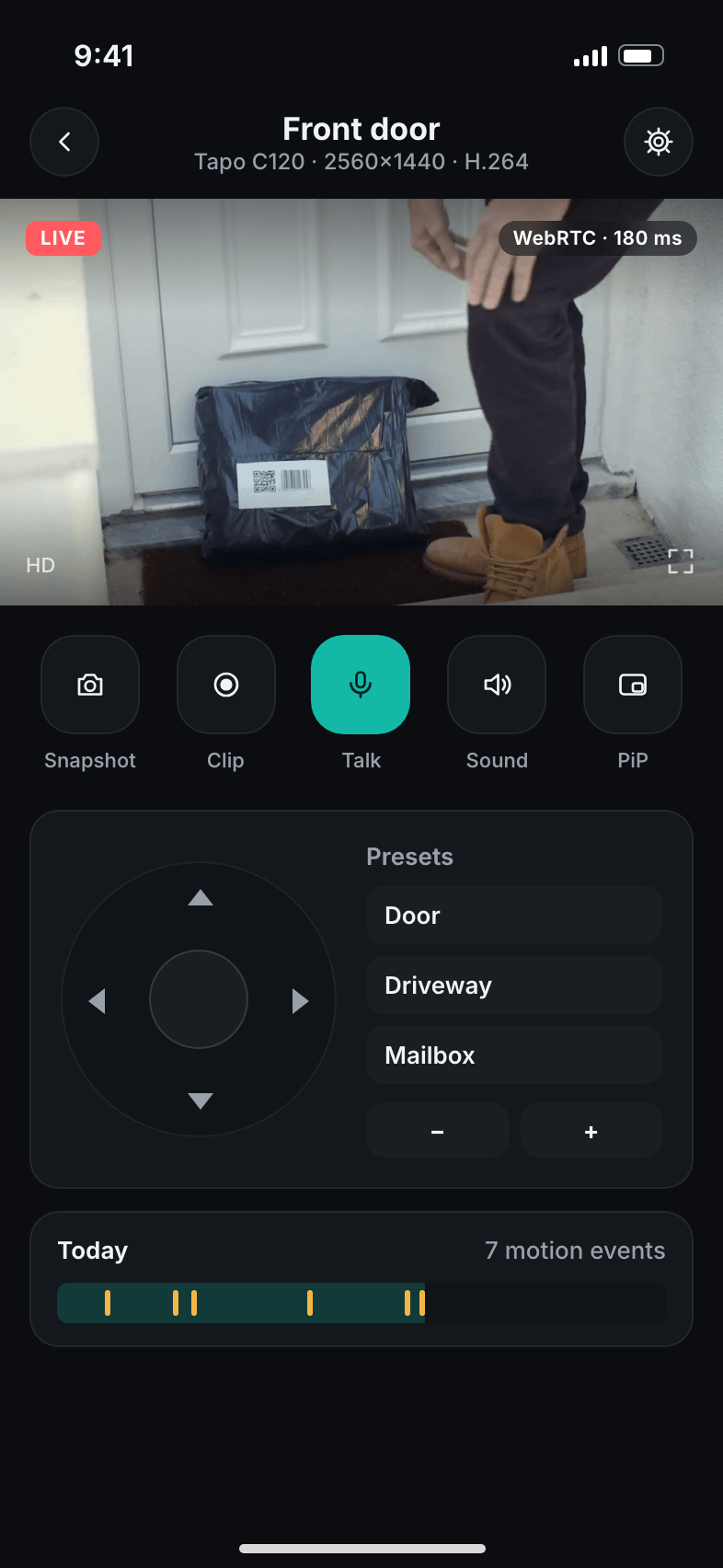
Live, talk, PTZWebRTC latency, two-way audio and presets. 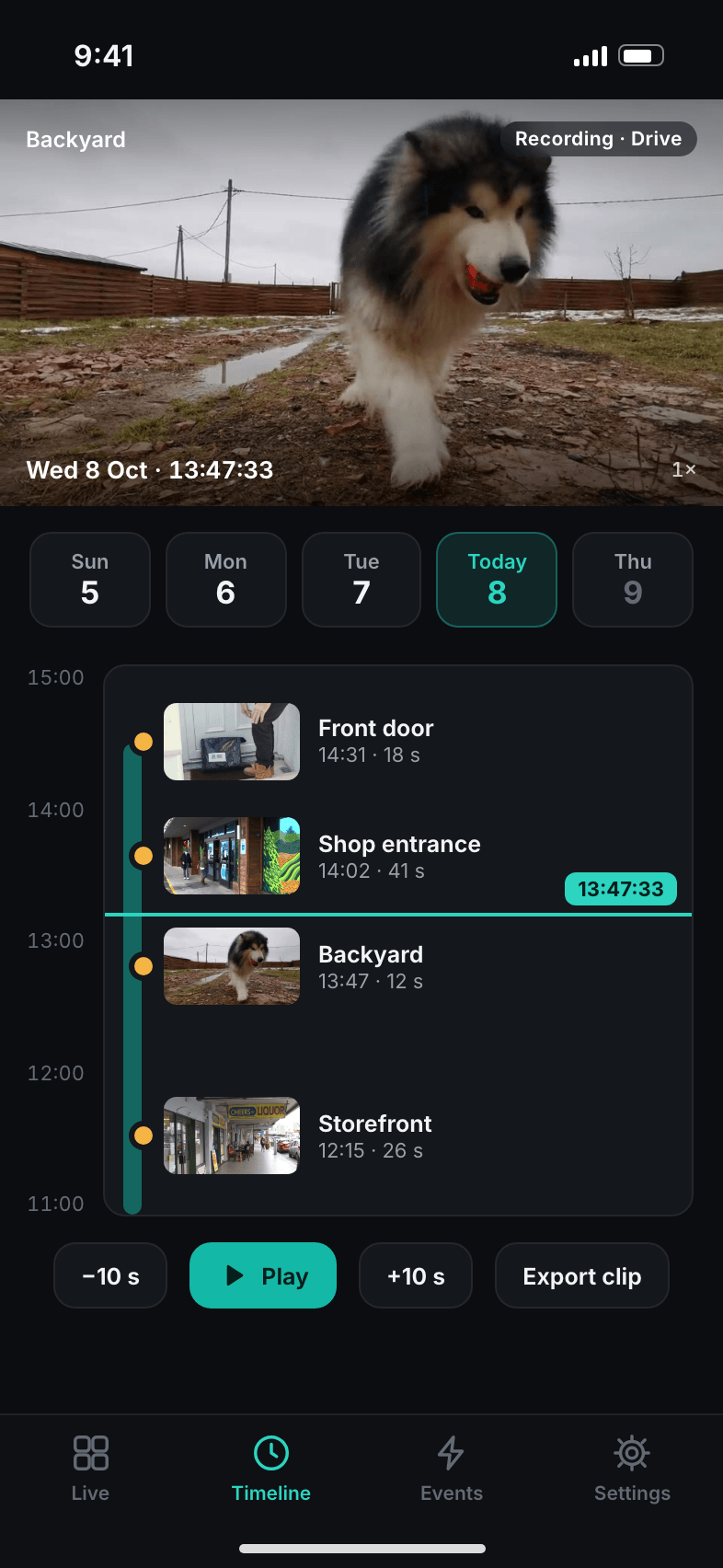
TimelineScrub any day, jump between events. 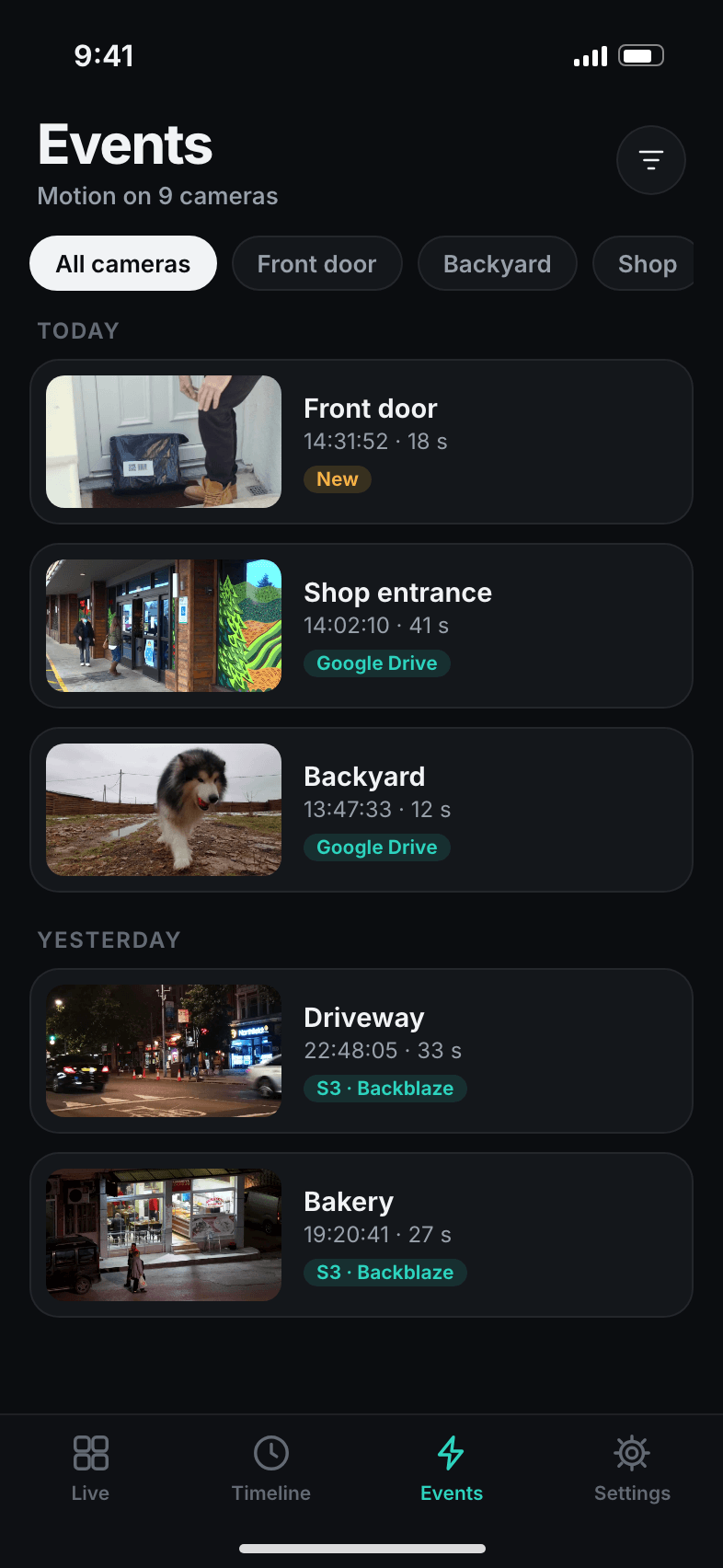
EventsEvery motion with snapshot, one tap to the clip. 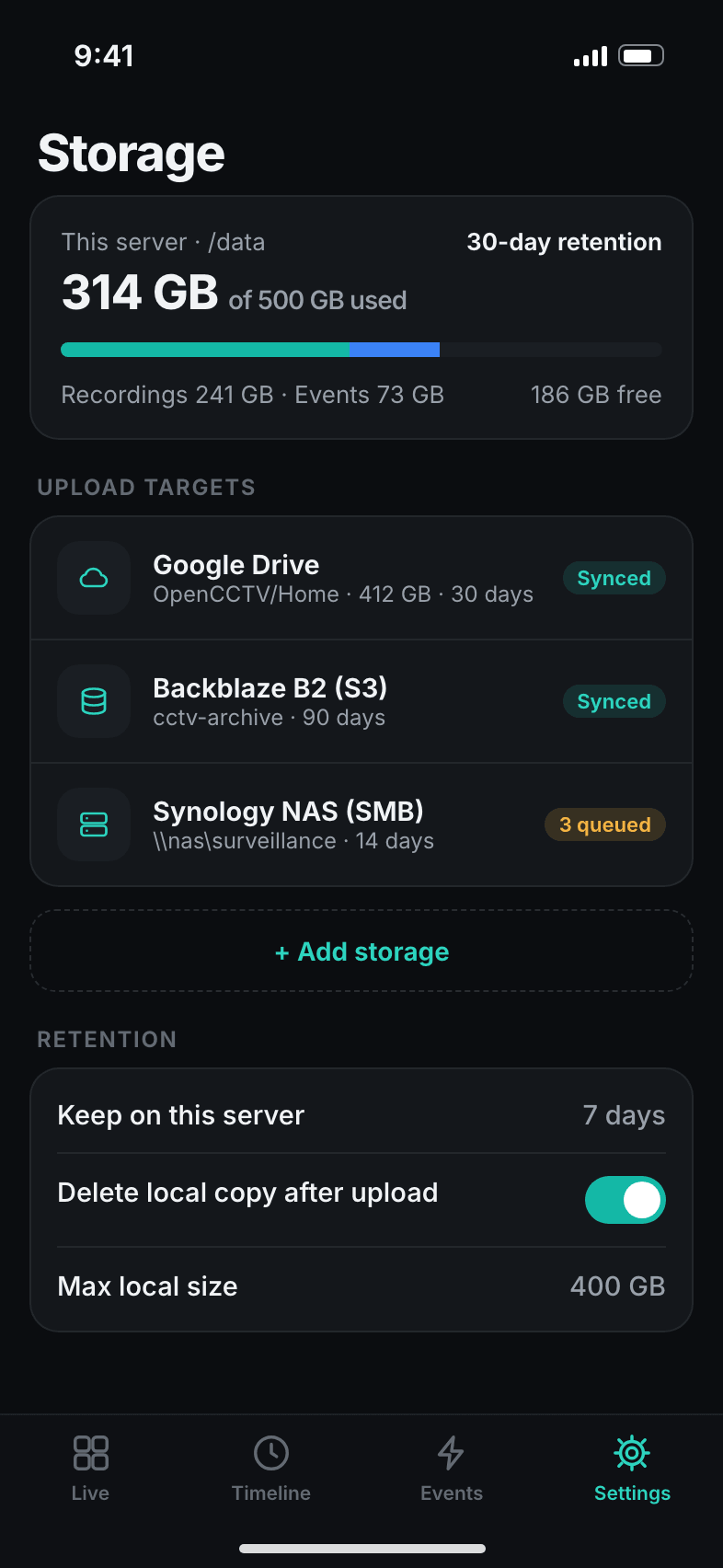
StorageSee where footage goes and for how long.
Camera, server, your storage. That is the whole path.
OpenCCTV pulls the streams from your cameras inside your network, records them on the server and copies the recordings to the storage you choose. The apps talk to your server, never to us.
Install the server
Docker, or one binary on Linux, macOS or Windows that starts on its own. Open port 8080 in a browser and create the admin account.
Add your cameras
Pick the brand, enter the camera account, test, save. Or let discovery and the UniFi import do it for you.
Choose where footage goes
Local disk, Google Drive, S3, a NAS or FTP, each with its own retention in days.
Pair your phone
Scan the QR code from the web UI. Live view, timeline and push notifications work right away.
Watch from anywhere. Open no ports.
Any OpenCCTV server can act as a gateway. Put one on a small VPS or in Coolify, link your home server once with a code, and the app reaches your cameras through an encrypted tunnel that your home server opens outbound.
- No port forwarding, no DynDNS. Works behind CGNAT and LTE routers.
- Several sites, one app. Home, office and the holiday flat behind one gateway.
- Your gateway, not ours. It is the same open-source server, running on a machine you control.
- Prefer a VPN? Tailscale, WireGuard or your router's VPN work too. The app only needs a URL.
Footage goes where you decide.
Recordings land on the server's disk first. From there OpenCCTV uploads them to one or more targets and deletes them again after the number of days you set. Nothing is sent anywhere you did not configure.
- Local diskAny folder, USB drive or mounted volume
- Google DriveSign in once with your Google account
- S3AWS, Backblaze B2, Wasabi, Cloudflare R2, MinIO
- SMBWindows shares, Synology, QNAP
- SFTPAny server you can SSH into
- FTPIncluding routers like the FRITZ!Box
- WebDAVNextcloud, ownCloud, Hetzner Storage Box
- DropboxPersonal and business accounts
- OneDrivePersonal and Microsoft 365
- Several at onceFor example 7 days local, 30 in Drive, 90 in S3
Retention per target
Each target cleans up after itself. Keep a week on the server and three months offsite.
A disk that never fills up
Set a maximum size for local footage. The oldest recordings go first, optionally right after upload.
Playback from anywhere it lives
The timeline plays recordings from the local disk or streams them back from remote storage.
Running in a minute.
Pick one. Each starts the server on port 8080 and keeps all data in one place: the opencctv volume in Docker, ~/.opencctv on Linux and macOS, %APPDATA%\OpenCCTV on Windows.
Dockerrecommended
docker run -d --name opencctv --restart unless-stopped --network host -v opencctv:/data ghcr.io/codextde/opencctv:latestLinux and macOS
curl -fsSL https://opencctv.codext.de/install.sh | shWindowsPowerShell
irm https://opencctv.codext.de/install.ps1 | iexDocker Composealso works as a Coolify resource
services:
  opencctv:
    image: ghcr.io/codextde/opencctv:latest
    restart: unless-stopped
    network_mode: host
    volumes:
      - opencctv:/data
volumes:
opencctv:- Open
http://<server-ip>:8080and create the admin account. - Add cameras. Choose the brand, enter the camera's login, test and save.
- Install the app and scan the pairing QR code under Users & devices.
Host networking lets ONVIF discovery and WebRTC work without port mappings. The installers download the latest release from GitHub and set it up to start automatically with systemd, launchd or the Windows Task Scheduler. Read install.sh or install.ps1 before you run them.
Questions self-hosters ask.
My Tapo camera has no SD card. Does it work?
Yes. OpenCCTV records the camera's live stream, so neither an SD card nor Tapo Care is needed. You only have to create a camera account once:
- In the Tapo app, open the camera and tap the gear icon.
- Go to Advanced Settings, then Camera Account, and set a username and password. This is not your TP-Link ID.
- In OpenCCTV, add a camera, choose TP-Link Tapo and enter the IP address and that account.
PTZ models like the C200, C210 and C500 are controlled over ONVIF. For two-way audio, optionally add your TP-Link cloud password.
Is it really free?
Yes. The server and the apps are open source under the MIT license. There is no paid tier, no camera limit and no feature behind a paywall. You pay only for the hardware and the storage you choose. Codext GmbH builds OpenCCTV in the open on GitHub; issues and pull requests are welcome.
Does video leave my network?
Only to the storage targets you configure and to your own devices when you watch. There is no OpenCCTV cloud. Codext receives no video, no snapshots and no metadata.
If you turn on push notifications, your server sends the notification (camera name and time) through Expo's push service to Apple or Google so it can reach your phone. Snapshots and video are not part of it.
How do I watch my cameras when I'm away?
Two options, neither needs port forwarding:
- Gateway: run a second OpenCCTV on a VPS or in Coolify and link your home server to it. The home server keeps an outbound tunnel open; the app connects to the gateway.
- VPN: Tailscale, WireGuard or your router's VPN. Add the server's VPN address in the app.
A reverse proxy with HTTPS in front of the server works as well, if you prefer to open a port.
Which cameras are supported?
Anything that offers RTSP, RTSPS, ONVIF, HTTP MJPEG or can push RTMP/RTSP. The brands listed above have presets that fill in stream paths for you. Cloud-only cameras such as Ring, Arlo, Blink or Nest do not offer a local stream and do not work. Some battery cameras only stream while RTSP is active and drain faster.
What hardware do I need?
Any always-on x64 or ARM64 machine with enough disk. Because recordings are stored without re-encoding and motion detection looks at a small, low-frame-rate copy of the stream, the CPU load per camera is low.
For disk space, a 2K camera at about 2 Mbit/s needs roughly 21 GB per day of 24/7 recording. Motion-only recording usually needs a fraction of that.
Can I keep using UniFi Protect?
Yes. The import logs into your console, enables RTSP on the cameras and adds them to OpenCCTV. Protect keeps working; OpenCCTV simply records a second copy where you want it, for example in Google Drive or S3, and gives you an app that works without a Ubiquiti account.
Do I need an account with you?
No. You create the admin account on your own server. The apps store only the address of your server and an access token on the phone. We do not know who uses OpenCCTV.
More answers on the support page.
See it before you install it.
The demo server runs several cameras with real recordings and motion events. Log in with demo / demo, or point the app at it.